Preference for the old design
Hey, I know it’s just a personal preference but I liked the old design compared to the new one for several reasons:
The new schedule looks like a table whereas the old one looked like an actual list (the time was colour-blocked together with the task).
The new colour blocks have rounded corners, which is distracting for me, I preferred the old rectangular side to side colour block (they filled out the whole screen) much more.
The moving line to indicate time is also distracting. To be honest it is also stressing me out, would love it if I had the option to remove it 🙏
The text for time and task description is placed on top left, whereas before it was vertically centred. Centre alignment is much less distracting for the eye.
Just like someone already said, before the schedule was much more condensed, one look and I could see what tasks are ahead. Now I have to constantly scroll up and down.
I preferred the old way of scheduling longer tasks as the repeats of that task instead of making the time block look really big, because now it’s much harder for me to at a glance estimate how long the task will take.
Currently for me when in Split view the time is cut off:
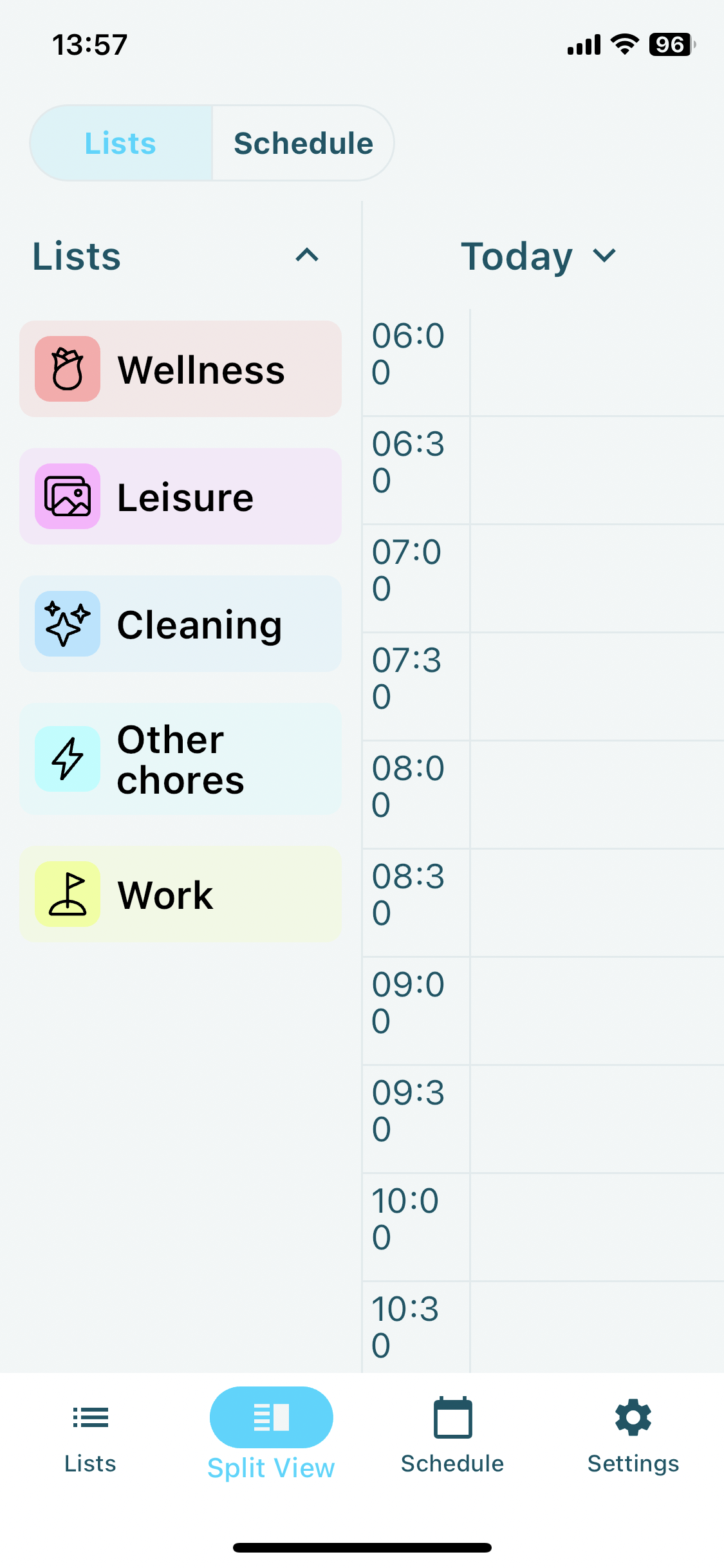
Basically, before I found the design to be much more simple, which is great for productivity tasks, because the simpler the layout, the less distracting it is and the more I can focus on actual tasks. Would love if I could choose to have the old design as an Appearance option 🙏❤
Thank you for your hard work! 🌼Really appreciate this app 🌼
Kamile
Log in to comment and vote
Comments2
Jul 21, 2024
PinnedMany elements of this request are fulfilled in the latest TimeFinder version v8.0.9, with the introduction of Schedule Appearance options. The update is available on iOS and Android now, and will available on Mac later today.
A gif below shows the new options. Glad to hear what you think.
As for the remaining items, I will re-file them under new and separate posts.
Thanks for your feedback!
Luke M
Jul 15, 2024
Thank you very much for taking the time to share all this Kamile, I really appreciate it, especially in how you’ve laid it out in such a respectful way—I’m sure you can imagine not every request I’ve received this past week has been this cordial! 🙏
I appreciate your patience with the new version, and I apologize for the inconvenience in introducing changes that you’d prefer to do without. In short, while many of the changes I’ve introduced in this new version were deliberate, there are a number of things that are different simply because of lack of resources/time—I did my best, but after an extended development timeline (~2 years), financial circumstances inclined me to accept some differences rather than deepen my debts in pursuit of perfection.
Of course, you might ask why rebuild it at all—simply put, the previous version was architecturally incompatible with many of the enhancements that I (and other users) have wanted for years, and it was the only path forward that made sense for growing the project.
Anyhow, it will take some time to work out the kinks, but you can rest assured that I intend to introduce options to customize the app’s interface (as well as bring back a number of minor functions) in the weeks and months to come.
Feel free to email me with any additional feedback or questions. Thank you!
Luke