Locked task collisions
When moving a task or adding it to a specific time, if that time slot already contains a task that’s locked,
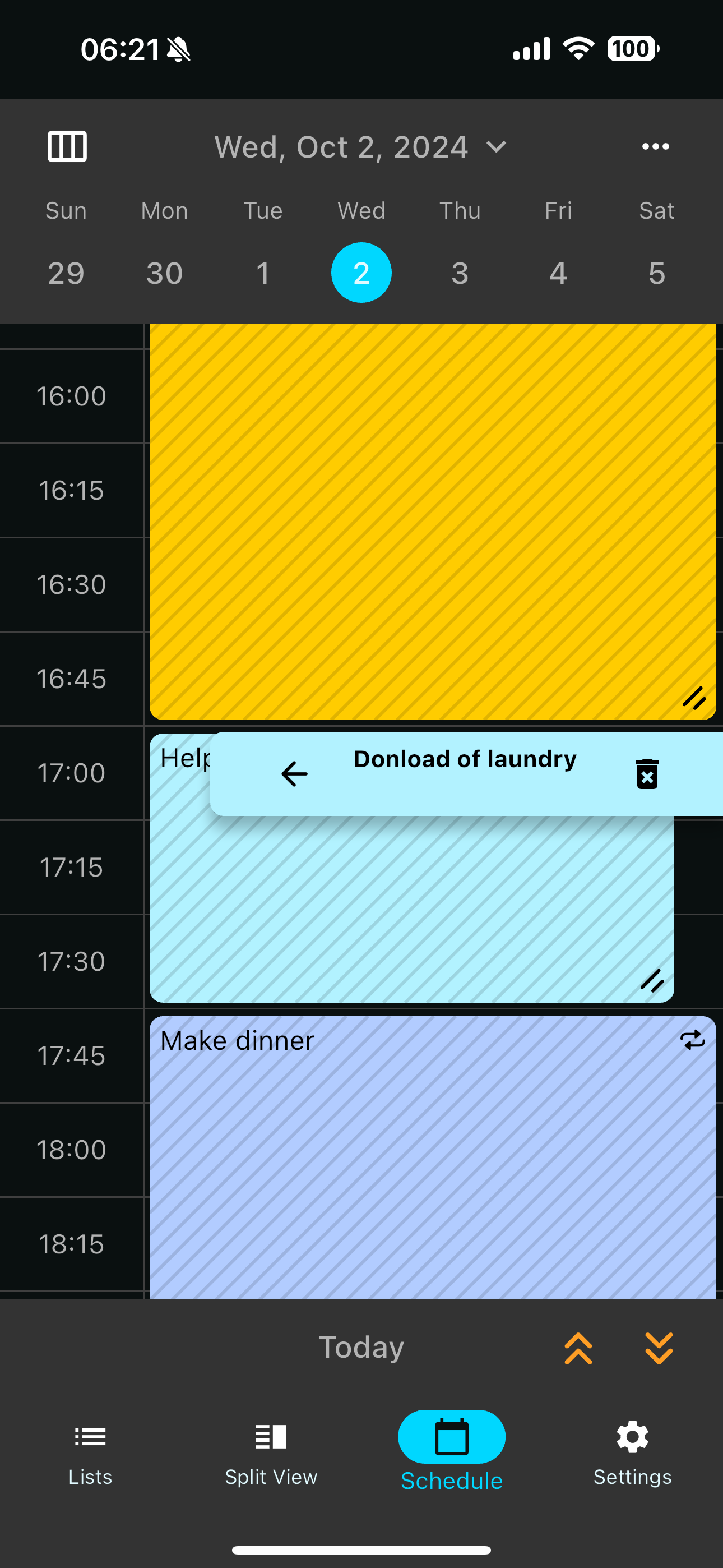
the new task is stuck on the side and you can’t move it to the front to edit it. The only option is to delete it and manually add it. It would be nice if the locked tasks would still slide to the side so you could edit the other task. If you’re going to let me have two tasks in that slot I should be able to edit them both.
Log in to comment and vote
Comments8
Nov 7, 2024
PinnedThis should be resolved in the latest version, 8.4.3. Please give it a try and let me know if you see any other issues. Thank you!
S Clark
Oct 25, 2024
Not sure if this is part of the same bug or if you want a new report. I’m running the TestFlight update.
When a regularly scheduled recurring task (below not seen in video) collides with an imported task from calendar (yellow) it pushes it to the side like expected. When I try to slide it over using the arrow it asks if I want to do this for all the events. I am not changing anything I’m just wanting to look at it. Something I might do several times back and forth. I can see asking if I want it to default in front. But the generic “modify recurring appointment” is what we expect to see when we are modifying the entry and makes it seem like we are changing something about it (moving it to a new time or shortening it etc)
Luke M
Oct 29, 2024
Hey @S Clark , just to follow up on this one:
Thank you so much for sharing this report. I totally understand the trouble you’ve seen with this functionality—it’s a tricky hunk of code to work with and I’m not surprised to hear that it needs some refinements. To that end, your reports have been super helpful in guiding us towards understanding the most common ways that a user might want to interact with these features.
We’ve been discussing this issue internally for a few days and will be implementing a solution this week. I appreciate your patience and really appreciate you taking the time to share your reports!
-Luke
S Clark
Oct 24, 2024
So it now can easily toggle between locked tasks but if you manually add a new task you can’t ever get to it.
Luke M
Oct 2, 2024
@S Clark Thank you for reaching out. I see your point about wanting the ability to edit a so-called “minimized” appointment while it is minimized.
But aside from that, I am a bit confused about the exact scenario you’ve encountered here.
In the screenshot you’ve provided, you should be able to hit the ← arrow button on the “Do Laundry” appointment, and that should swap its priority with the “Help[…]” appointment—allowing you to edit it as usual. Then, after you’ve done that, you should be able to tap on the now-minimized “Help[…]” appointment, hit its ← button, and you’ll have achieved the result I believe you’re looking for.
In contrast, it sounds like you’re saying this isn’t working, is that right? If so, then it sounds like you’re observing a bug, and I have a couple more questions:
Is that “Help […]” appointment a recurring appointment? (It’s not visible in the screenshot). Perhaps this issue is specific to recurrence.
Is this situation (wanting to have multiple tasks overlapping) a common workflow for you? What are the steps you took to get into this situation?
Thanks for any and all details you can provide, I really appreciate your time and patience!
Luke
S Clark
Oct 2, 2024
yes it appears to be a bug that seems to be related to locked tasks. Help in this scenario is a recurring task.
I went back and checked and if I lock a task manually it will still swap with a minimized task so you are correct that it is limited to recurring tasks
Luke M
Oct 2, 2024
Thanks for the details, my team and I will look into this right away. Sorry for the inconvenience!
S Clark
Oct 2, 2024
Appreciate the prompt eval!