Resolve difficulty moving large tasks in schedule
Moving a task that spans all or more of the slots on the screen is very difficult because it wants to move to far or to the wrong space. To solve this, I would like to suggest enabling 2-finger task movement. Essentially, with one finger on one hand tap and hold down on the task in the schedule to move it. With another finger—probably on the other hand—drag the time slots up or down until the top of the task sits in the time slot that should be the beginning of the task.
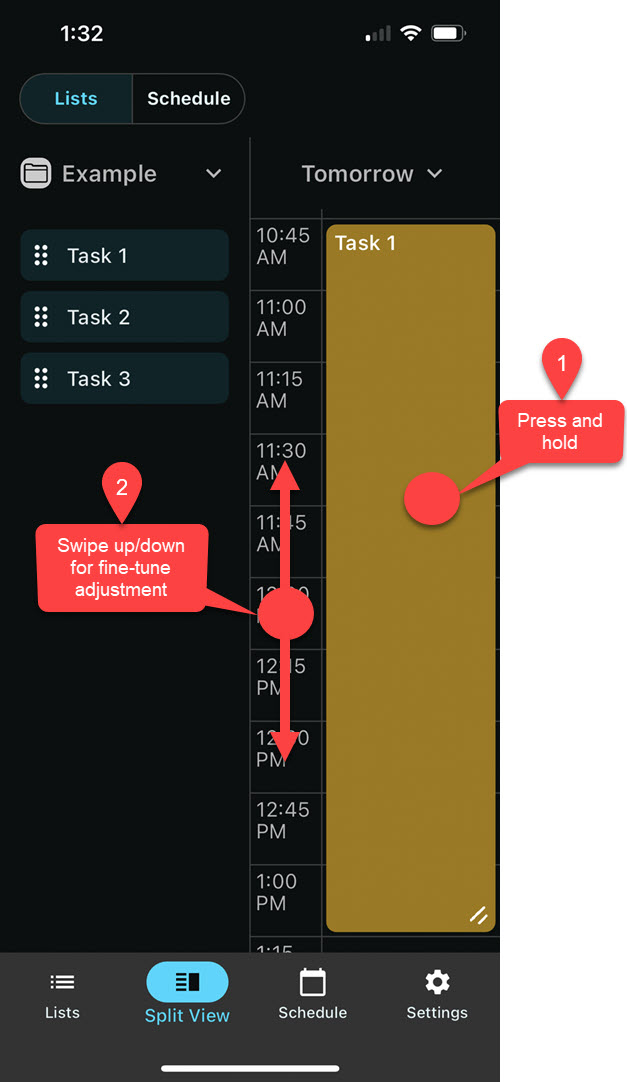
This functionality already sometimes works, but is is not consistent. In my experience it works less of the time than it does.
Log in to comment and vote
Comments2
Luke M
Aug 10, 2024
Thanks for the feedback Joel; this edge-scrolling is indeed a weak spot of the app right now. In response to your feedback here, I’ve revised the mechanic slightly in the upcoming version 8.1.11 to be more usable, although it’s still choppy and unpleasant. I appreciate your patience while I prioritize more pressing bugs, but I absolutely hope to improve this much more in the coming months.
Aside from that, in your comment, you mentioned: “I think it would be better to have the auto-scroll of the time disabled”. I’ve noted your request. Side note: I have something sorta-kinda related that might be worth noting—I’ve recently added a function in “Settings>Schedule” called “Auto Scroll to selected Appointment” that might be of interest to you as a general UX option.
I’ve also noted your request about an undo function—I’ll be looking at implementing ‘undo’ throughout the app in the coming months as well.
Thanks!
airstrip
Aug 5, 2024
If this functionality is consistent, I think it would be better to have the auto-scroll of the time disabled—or at least make that a setting.
Related to this, it would also be nice to have an “undo” button in case I accidental mess up task ordering in the schedule and I’m not sure what I did.