Allow "splitting up" a long task when a smaller one is dropped on it
There are times where I have a task scheduled for a large chunk of time. Then, there are things that interrupt that task and I’d like to just drag another task from the list into the slot where the other task overruled and TimeFinder “split” the larger task schedule automatically.
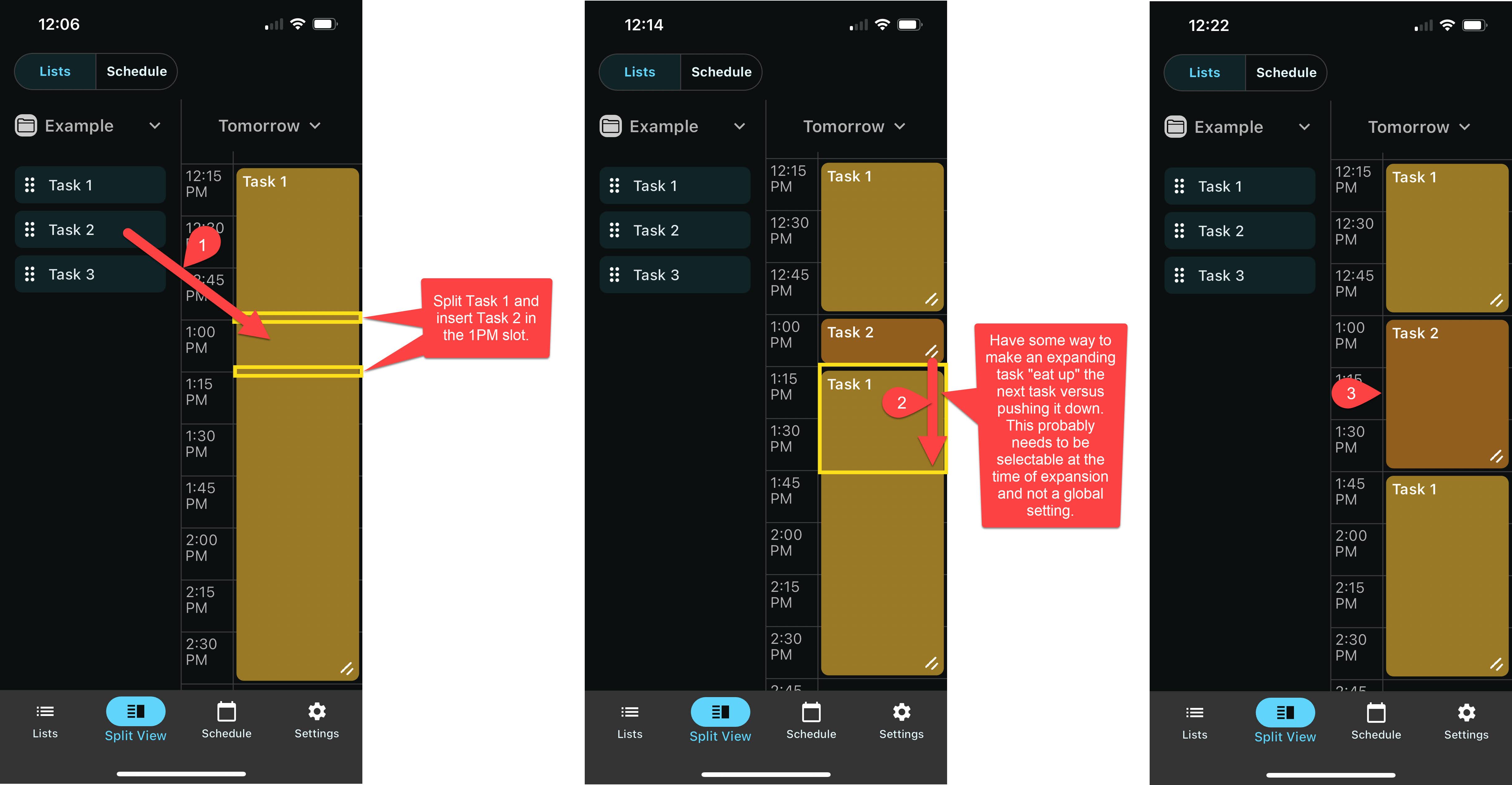
As I mention in the comment in the screenshots, it would be nice for a task that has “split” another task to “eat up” the other task as it’s dragged down versus trying to push the other task down. It might even be nice to support this through maybe long-press on the expanding lines and then dragging.
Also, having an “undo” button for fixing any mistakes would be nice.
Log in to comment and vote
Comments11
May 5
PinnedNow available in v9.6.10. Thank you!
May 3
PinnedAt long last, this feature is built! It will be available in the next release.
This one was a real challenge. If this new feature (and TimeFinder in general) are helpful in your life, please consider a brief review on the App Store or Google Play Store: it truly helps a ton!
-Luke
Feb 10
PinnedWhile this feature (exactly as described) isn’t available yet, I wanted to share a similar feature that I recently built into the app that might be helpful in the meantime:
In TimeFinder v9.3, you can triple tap on any timeslot’s time label, and TimeFinder will push down the appointment at that timeslot and any appointments below it. It will also split the appointment at that position if needed.
This is quite a niche feature, and subject to change, but I figured I’d share it here in case it might be useful to anyone. Thanks!
airstrip
Feb 11
Cool! Neat idea. I’ll have to give it a try.
Luke M
Aug 10, 2024
Hey Joel, thanks for the feedback here, and sorry I missed this one earlier; I’m doing some catching up—it’s been a busy month.
You’ve raised a couple requests, so I’ll address each separately:
In Split View, when a task is dropped onto an existing appointment, allow that task to overwrite the dropped portion
Neat concept! Tricky though, and could be counter-intuitive until it is explained to users.
Option to allow an appointment to “eat up” time of a downstream appointment, rather than “push” it.
Similarly, I see the value here, but it’s very complex, and raises a number of technical challenges. Most people see the “pushing” mechanic in TimeFinder as one of its most powerful & defining characteristics as well, and I’m always hesitant to introduce things that are similar to that which people are already achieving in Google Calendar and the like.
To put it into perspective, it would probably take a week of engineering to bring these features to reality ($2000 - $4000), only for them to be hidden or available via a popup prompt, which would be questionable. I’d love to get to the point where I can justify that, but it might be a while more unless business really takes off.
I apologize for the disappointing news. I’ll certainly keep this one on the board though as a nice-to-have for the future, in case things turn around.
Thank you for sharing!
Luke
airstrip
Feb 11
Thank you, Luke! I appreciate your thoughtfulness and not chasing every feature idea to the detriment of the overall app.
Luke M
Feb 13
Thanks! I do what I can! Lots of wonderful ideas, and ultimately all representing some friction that deserves to be addressed—just a question of how, really!
courtyardiva@outlook.com
Dec 24, 2025
Undo is super important, I haven’t used the app enough to have an opinion on the other idea.
Luke M
Feb 10
Undo function is now supported, thank you !
Howard Gil
May 3
•Merged request
•2 votes
Ability to insert tasks onto schedule
Maybe I’m missing something but I can’t seem to drag tasks in between other tasks. In split view or in schedule view. Best i can do is press the double down arrows which pushes everything down then i have to individually move tasks back up to create a gap
Luke M
Jan 21
I understand your interest, but that’s by design for now.
As for why, some background:
You’ll notice that the app happens to already have two behavioral modes when it comes to drag and drop;
Non-swapping mode (Split View list to schedule, allows dropping one task into another to merge)
And swapping mode (schedule view; appointments swap positions when hovering)
Building this was way harder than it sounds, thousands of lines of code—so the idea of introducing a third mode (or a sort of sub-behavior to the non swapping mode) to handle a sort of temporary reversible push down of all appointments when hovering near a gap… makes me want to close my eyes 😅 🙈
Sorry to disappoint; Maybe one day! Or maybe I can think of a less glamorous but still useful solution. Open to suggestions!